
What Your Microsoft 365 License Already Includes for Process Automation (And That You’re Probably Not Using)

There is a conversation that repeats itself across many organizations. The IT manager spots inefficiencies in processes. Users complain that everything runs through email. Documents get lost and approvals drag on forever.
The usual response is to look for a solution — often external, and sometimes expensive. But the solution is already there. Inside the Microsoft 365 license your organization already has.
In this article, we explain what that license includes for automating processes, and when it makes sense to go one step further — without paying more.
The Typical Scenario: Manual Processes
In many organizations with Microsoft 365 active, document management follows a familiar pattern. Approvals go through email. Someone sends a document, another person replies with comments, a third forwards the “final” version — but nobody knows which one is actually the latest.
Tracking is done in Excel. A shared spreadsheet that no one updates in time, with statuses like “pending,” “under review,” or “approved” that depend on someone remembering to change them. PDFs are passed from hand to hand with no traceability, no record of who did what, and no possibility of audit.
This scenario is not exceptional. It is the standard in many mid-sized companies that have Microsoft 365 active. When someone identifies the problem, the most well-known solution involves Power Apps or Power Automate Premium — powerful tools, but with an additional licensing cost that is not always justified for internal processes with limited scope.
What many IT managers do not know is that there is another way. It requires no extra licenses, is included in M365, and solves more use cases than it might seem.
What Your M365 License Already Includes for Document Automation
The Microsoft 365 license includes specific tools for process management and automation. In many organizations, these tools are under contract but underused.
SharePoint as a Document Engine
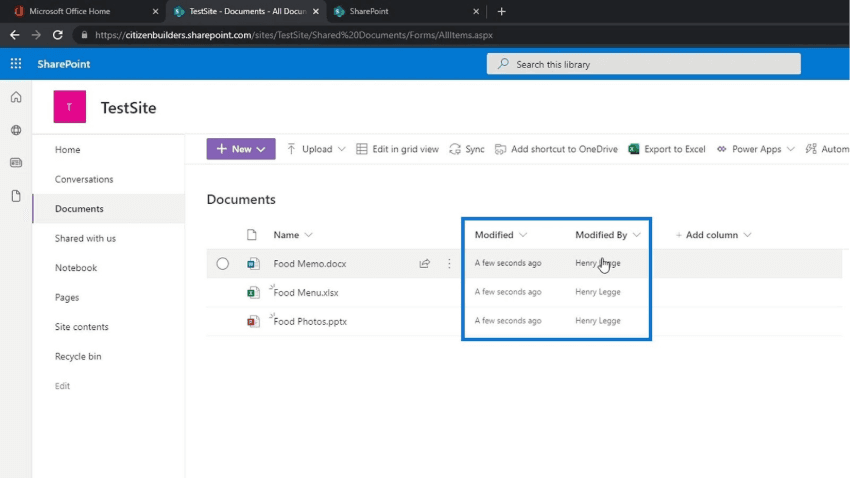
SharePoint is a complete document management engine. It allows you to organize documents with structured metadata — each file can have fields such as document type, department, status, or expiration date, without depending on the file name or the folder it is saved in.
It manages versions automatically. Every time someone modifies a document, SharePoint saves the previous version. You can recover any version in seconds.
Permissions are defined at a granular level: a library accessible to the whole department, a folder restricted to the manager, a document shared with only two people — all without additional cost, included in any Microsoft 365 Business or Enterprise plan.
A well-configured SharePoint library eliminates document chaos. Users access it from a browser or from Teams, without introducing external tools into the environment.
Microsoft Lists for Structured Process Management
Microsoft Lists allows you to create structured records for managing internal processes. It is more flexible than Excel, simpler than a database, and natively integrated with the M365 ecosystem.
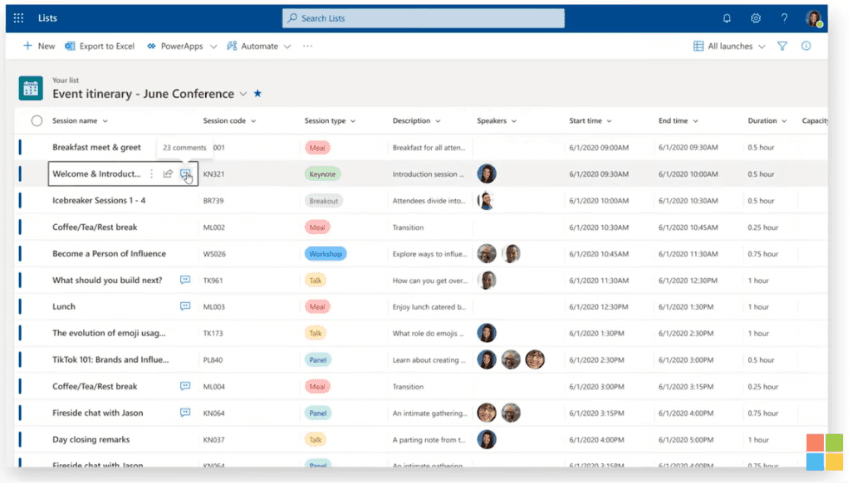
Common use cases include managing documentation requests, tracking the status of contracts, controlling pending approvals, or logging internal incidents.
Each list can have custom columns, role-filtered views, and automatic alerts when the status of a record changes — all configurable without any development required.
Basic Power Automate, Included in M365
The version of Power Automate included in M365 is not the Premium version, but it resolves more than 60% of common use cases. It allows you to create automatic notification and approval workflows. For example, when someone uploads a document to SharePoint, the system notifies the responsible person. They receive an email with approval or rejection buttons, the result is recorded, and the requester receives a notification.
All automatic. No intermediate emails, no manual tracking in Excel.
Other common flows include: moving approved documents to another library, sending reminders for pending reviews, or logging every action taken on a document in Microsoft Lists. The basic version does not support Premium connectors or highly complex flows — but for linear processes, it is more than sufficient.
When Is the Basic Version Enough — And When Do You Need More?
The native M365 tools handle the majority of cases well. They are sufficient when the process is linear, few stakeholders are involved, no custom interface is needed, and the approval flows are simple and predictable. In those situations, SharePoint, Microsoft Lists, and basic Power Automate cover 60% of needs — and you have already paid for them.
You need to go further when the process involves multiple roles with different rules, when user experience is critical for adoption, or when document volume is high and requires advanced automation.
In those cases, the answer is SPFx — SharePoint Framework — the native development standard for Microsoft 365. It allows you to build custom solutions within the environment you already have: tailored forms, role-based dashboards, multi-level approval flows, integrations with ERP or CRM systems. No additional platform cost. The only cost is development.
Some real-world examples of what it enables:
- Multi-level contract approval. A company needed to digitize its contract approval process: four review levels, routing rules based on contract value, and automatic archiving upon completion. Basic Power Automate was not enough. With SPFx, it was built inside Teams, without additional licenses, in under two weeks.
- Onboarding document portal. An HR department needed a portal where each new employee could see exactly which documents they still needed to submit, personalized by profile and with automatic alerts — all inside M365, no external tool, no Power Platform licenses.
- Field report validation. An industrial company needed its field teams to validate reports from their phones, with a subsequent approval flow and automatic archiving in SharePoint — all from Teams, no external apps, no additional platform cost.
The Change Brought by AI: This Level of Customization Is Now Accessible
Building on SPFx was always technically possible. The problem was the time it required and the specialized profile needed. A custom development on SharePoint Framework meant weeks of work, a developer with specific expertise, and a budget that was hard to justify for internal processes.
But that has changed now.
With AI integrated into development, timelines are compressed by 50% to 70%. What used to take three weeks can now be ready in one. What previously could not justify the budget now fits perfectly.
Advanced customization on M365 has gone from being a transformation project to an operational improvement with a fast return — accessible to mid-sized organizations that previously could not absorb that cost.
Conclusion
Your Microsoft 365 license already includes the tools to automate processes. SharePoint, Microsoft Lists, and basic Power Automate are the starting point. SPFx is the next level when the process calls for it — with no additional platform cost, and more accessible than ever thanks to AI. The question is not whether you have the tools. You already do. The question is whether you are making the most of them. Do you want to find out which processes in your organization could be automated with what you already have in M365?
You have two options:
- Join the webinar on May 21st. Adrián Cano will demonstrate it live, in one hour, for free.
- Or if you prefer to talk first, we will do a quick review and give you a concrete diagnosis. Contact us and we will help you.
Frequently Asked Questions
What Microsoft 365 license do I need to start automating processes? Any Microsoft 365 Business plan (Basic, Standard, or Premium) includes SharePoint, Microsoft Lists, and basic Power Automate. No additional licenses are needed to get started.
What is the difference between basic Power Automate and Power Automate Premium? The basic version included in M365 allows you to create flows with standard connectors — sufficient for notifications, simple approvals, and moving documents between libraries. The Premium version adds connectors to external systems, more complex flows, and greater processing capacity. It has an additional per-user cost.
What is SPFx and why does it not require additional licenses? SharePoint Framework (SPFx) is Microsoft’s native development environment for building solutions within Microsoft 365. Because it runs directly on the M365 tenant, it requires no external infrastructure or Power Platform licenses. The only cost is development.
How long does it take to implement a document automation solution on M365? It depends on the complexity of the process. A basic solution with SharePoint, Lists, and Power Automate can be operational within a few days. A custom solution with SPFx can take between one and three weeks. With AI integrated into development, timelines have been significantly reduced.
Do I need an internal technical team to maintain these solutions? Basic solutions on SharePoint and Power Automate can be managed by an M365 administrator without development knowledge. SPFx solutions require technical support for changes or updates, although day-to-day maintenance rarely requires frequent intervention.
Is it possible to integrate these solutions with other systems such as an ERP or CRM? Yes. Basic Power Automate includes connectors for the main systems on the market. For more complex integrations or proprietary systems, SPFx offers greater control and flexibility. In both cases, it is possible to connect M365 processes with external systems without additional middleware platforms.