
Integration of Microsoft Fabric and Power BI: Revolutionizing Data Analysis

In today’s business landscape, effectively managing and analyzing data enhances operational efficiency and provides a crucial competitive advantage.
Recent innovations in analytics, such as the integration of Microsoft Fabric and Power BI, are changing how organizations access and manage data. At the same time, they are transforming how companies act on information. This article details how this synergy is transforming data analytics and enabling a truly data-driven culture.
Microsoft Fabric: A Comprehensive Analytics Platform
Microsoft Fabric is an end-to-end data platform designed to unify and simplify data management.
Fabric brings together seven specific workloads into a unified experience. This significantly reduces the costs and efforts associated with integrating services and managing data.
These modules include:
- Data Factory: Facilitates the creation and orchestration of data workflows.
- Data Engineering: Provides robust tools for data engineering.
- Data Warehouse: Enables efficient storage of large volumes of data.
- Data Science: Equipped with advanced tools for data analysis and modeling.
- Real-Time Analytics: Enables real-time data analysis for instant decisions.
- Data Activator: Allows data activation for use in applications and workflows.
- Power BI: Directly integrated for data visualization and analysis.

OneLake: A Unified and Open Data Lake
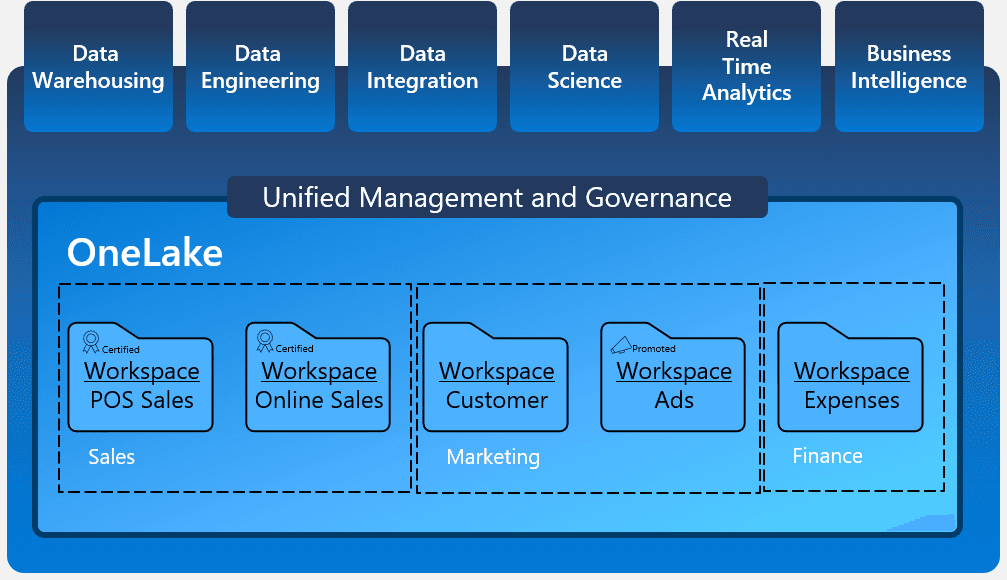
OneLake is the heart of Microsoft Fabric. It is a unified data lake that facilitates centralized storage and access to all of an organization’s data. Thanks to its open data format, OneLake allows:
- Multi-Cloud Connectivity: Connect data from multiple clouds, accounts, and domains, creating a single source of truth.
- Minimization of Duplication: Data only needs to be loaded once, reducing duplication and uncontrolled expansion.
- Simplified Access: Automatic integration with all Fabric workloads, facilitating data access and use.
Power BI: Enhancing Data Exploration and Visualization
Power BI has established itself as an essential tool for data visualization. Its integration with Microsoft Fabric takes its capabilities to a new level. The key features of this integration include:
Direct Lake Mode
Direct Lake Mode allows Power BI semantic models to directly access Delta-Parquet files in OneLake. This combines the advantages of import and direct query modes, providing very fast query performance without the need to move data.
Copilot in Power BI
Copilot is an AI-powered tool that helps users create reports and explore semantic models. Copilot’s functionalities include:
- Report Generation: Helps users get started with report creation by identifying relevant tables, fields, measures, and charts.
- Data Exploration: Allows less experienced users to explore their data and gain insights without needing advanced technical knowledge.
- Suggestions and Summaries: Provides data summaries and suggests topics for report pages, streamlining the analysis and communication of insights.
If you want to learn more about how to use Copilot in Power BI to create reports, click here.
Capacidades Avanzadas de Seguridad y Gobernanza
Microsoft Fabric and Power BI continue to enhance data security and governance measures:
- Row-Level and Object-Level Security (RLS and OLS): These features allow defining access rules at the row and object level, so users only see data corresponding to their specific roles and permissions.
- Stored Credentials: Simplify security configuration by efficiently managing the credentials needed to access data.
Boosting Productivity with Artificial Intelligence
Artificial intelligence is integrated into every layer of Microsoft Fabric, empowering data professionals to perform tasks more efficiently:
- Building Data Flows and Pipelines: Uses natural language to define complex data flows and analytical pipelines.
- Generating Machine Learning Models: Facilitates the development of machine learning models directly within the platform.
- Writing SQL Queries: Allows users to write and optimize SQL queries using natural language commands.
Cost Optimization and Flexible Licensing
Microsoft has introduced flexible licensing options for Microsoft Fabric, with pay-as-you-go models and reservation pricing that allow organizations to significantly save on their data management costs. These options are complemented by advanced business continuity and disaster recovery (BCDR) capabilities and caching.
Use Cases and Benefits
Organizations adopting the synergy between Microsoft Fabric and Power BI experience numerous benefits:
- Reduction of Data Fragmentation: Unifies all data into a single data lake accessible to all workloads.
- Improvement of Operational Efficiency: Automates and simplifies data workflows, reducing the time and effort needed to manage and analyze data.
- Empowerment of Business Users: Allows users to access governed data and create reports without relying on technical teams.
- Scalability and Performance: The auto-scaling model and support for real-time queries ensure that analytics solutions can grow with the organization’s needs.
Conclusion
The synergy between Microsoft Fabric and Power BI is revolutionizing data analytics. It provides a robust, integrated, and AI-powered platform. This integration not only improves efficiency and reduces costs but also facilitates data-driven decision-making, driving organizational success in an increasingly data-driven world.
Adopting these technologies allows organizations to stay at the forefront of innovation, optimizing their processes and leveraging the full potential of their data to gain valuable and actionable insights.
Explore how the integration of Microsoft Fabric and Power BI can transform your business, optimizing data management and analysis to gain a competitive edge. Contact us for more information and start enhancing your data analytics today.
Agustín Plaza – Software Engineer at Itequia