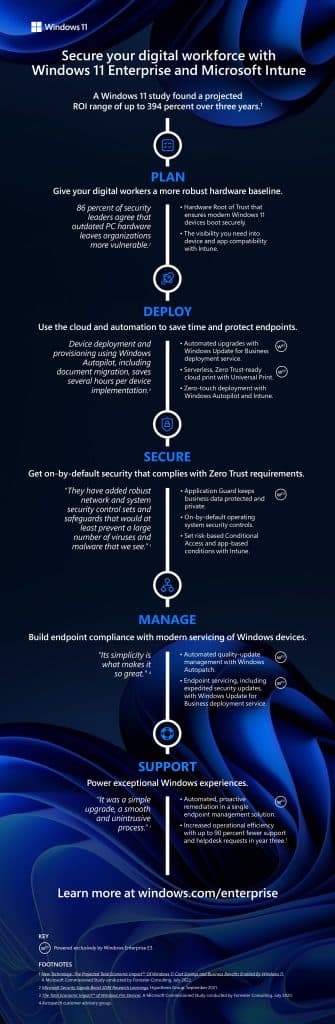
How to improve the efficiency and protection of IT equipment through unified management?

The key to successful workplace operations requires a balance between enabling agile operations and maintaining robust security. Whether 100% face-to-face, remote or hybrid, employees and IT teams need uninterrupted access to tools and resources without compromising the security of the organisation.
Flexible working offers a number of benefits for businesses and individuals. However, it comes with a number of security risks. These risks stem from the number and variety of EndPoints that IT teams must manage.
Want to know all about EndPoints? Read on! We’ll tell you all about how to improve the efficiency and protection of an IT team thanks to unified management using EndPoints, Microsoft Intune and Windows 11.
EVERYTHING YOU NEED TO KNOW ABOUT ENDPOINTS
EndPoints can be:
- Company-owned devices.
- Personal devices of each employee.
- Cloud-based access points in various work scenarios.
Due to operational inefficiencies or lack of resources, EndPoints security is becoming increasingly complex. As a result, companies are exposed to serious threats if they have not secured their EndPoints.
¿Sabías que entre el 80% y el 90% de los ataques de ransomware se llevan a cabo a través de dispositivos no seguros, sólo el 10% de las organizaciones monitorizan el 100% de sus EndPoints?
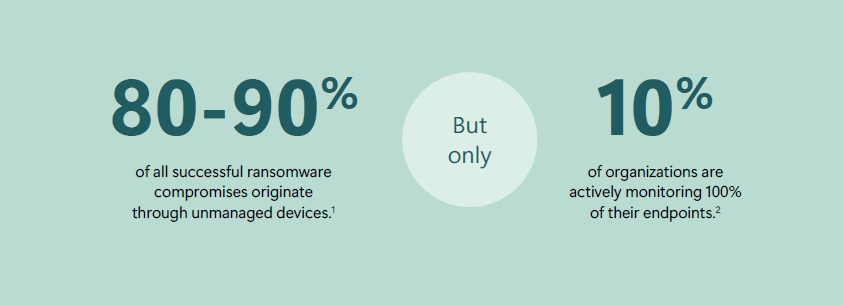
Companies are facing another problem: the wide variety of EndPoints management solutions. 72% of organisations have detected an increase in complexity within their IT environments in the last 2 years.
Many tools are often used for specific, isolated applications, creating a framework of disconnected solutions. The data is striking: 2 out of 3 use more than 10 different tools to protect their EndPoints.
THE BEST SOLUTION: INTEGRATED AND UNIFIED MANAGEMENT
In a recent survey, Microsoft asked professionals how they could improve the security of their organisation’s EndPoints. The top answer? “Integration. Let’s look at the benefits of integrated and unified management:
- By opting for a single-vendor type of management, IT teams simplify the management and security of their IT teams.
- The process of providing employees with secure access to company resources is streamlined.
- With a single EndPoints management solution, IT teams can focus on one stream of data, rather than spreading their attention across numerous data streams from multiple sources.
- This provides clearer visibility into the company’s threat landscape.
- Finally, it enables a stronger security posture without sacrificing employee productivity.
THE MAIN THREATS TO A COMPANY’S CYBERSECURITY
They say that a picture is worth a 1000 words, in this diagram we can see the results of the Microsoft Digital Protection Report 2023:
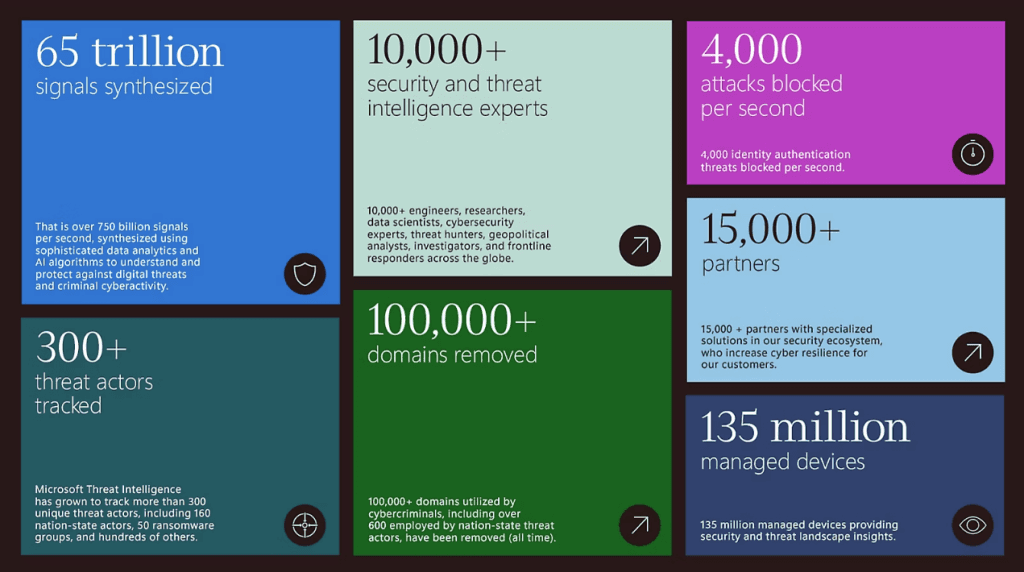
As the way we work evolves, operating systems are taking on an increasingly important role. They mean much more than a platform for productivity. They are key elements in a company’s security strategy.
In 2023, 30 trillion monthly attacks on passwords in Microsoft Entra (Azure AD) were identified, that’s 10 times more than in 2022.
However, it is important to note that there is a very simple solution to this scenario: the application of MFA (Multifactor Authentication). Applying it means a 99.2% reduction in risk, although 37% of organisations do not have it active. It should be noted that MFA is not going to shield us 100%, for which Microsoft applies Zero Trust.
ZERO TRUST AND WINDOWS 11 ENTERPRISE
Zero Trust is a proactive security model that treats every access attempt, regardless of the identity or EndPoint it comes from. Just like any other access attempt from an open network.
This model is the cornerstone of Microsoft’s security in all its aspects and, of course, in its next-generation operating systems.
Windows 11 Enterprise is based on Zero Trust and is secure by default. It helps organisations protect their corporate data, applications and people. Whether accessing Windows on a physical device or via a PC in the Windows 365 cloud. Employees gain access to next-generation productivity tools without compromising the security of their work.
- Secure by default from “on-chip” to “in the cloud
- Simplifies IT management
- Improves user experience.
Given today’s flexible EndPoints, Windows 11 Enterprise helps us to achieve more with less cost and complexity. But how exactly does Microsoft help us with this simplified, cost-reducing management? The answer is Unified EndPoints Management with Microsoft Intune.
FEATURES OF UNIFIED ENDPOINT MANAGEMENT WITH MICROSOFT INTUNE
Microsoft Intune is a simplified, cross-platform solution designed to provide secure access to all computing resources. Of course, it also supports Zero Trust. So it helps organisations adopt a much stronger security posture. Ultimately, pairing Windows 11 with Intune enhances and protects our company’s computing environment and helps us prepare for the future.
What are the core capabilities of Intune?
- Multi-Platform EndPoint Management.
- Integrated security of EndPoints.
- Management of mobile applications and devices.
- Define and ensure device compliance.
- Analytics of each and every EndPoints.
- Shared management of devices.
All centralised and integrated in a single tool and in a single ecosystem.
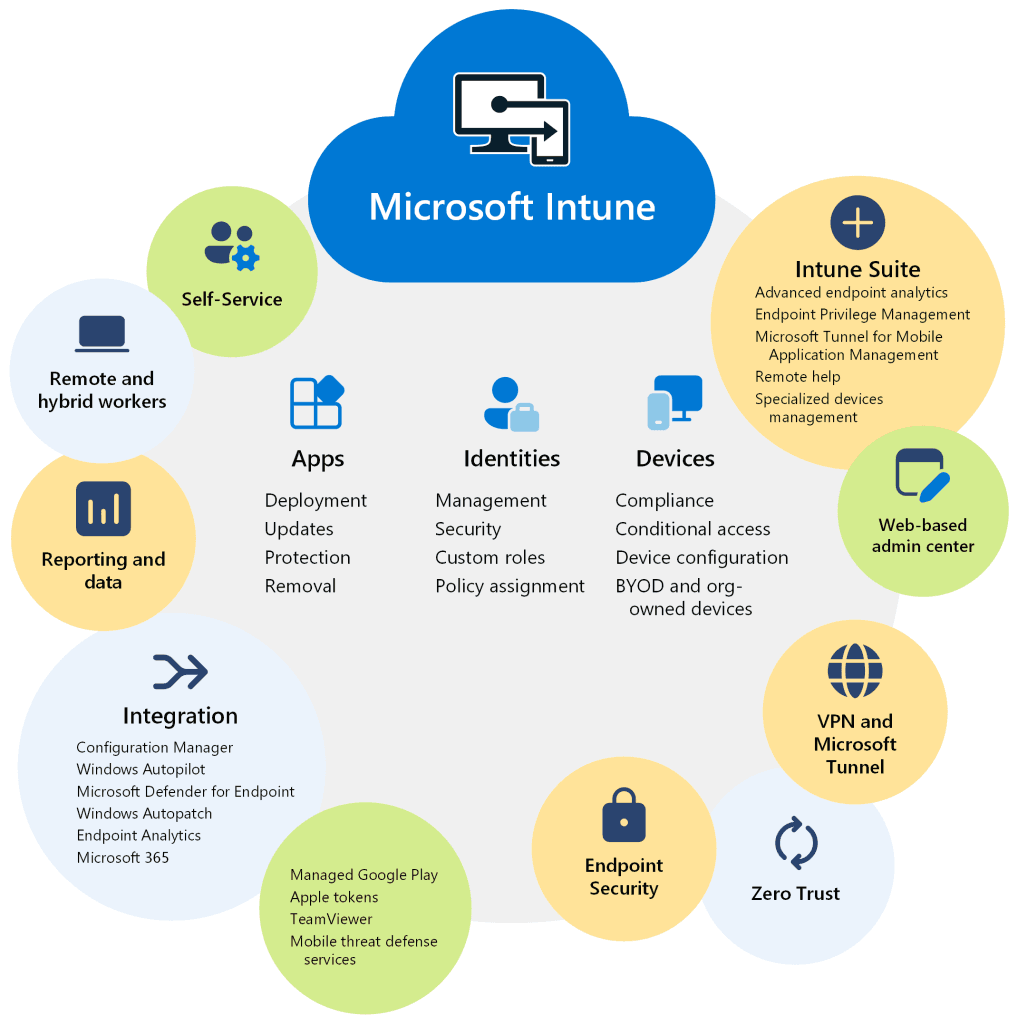
Intune improves productivity for both IT teams and other employees:
What benefits does it bring to employees?
- Improved productivity, as they can securely access it from anywhere, on any device.
- Improved user experiences: Zero-touch deployment (it installs itself and the user has to do virtually nothing) ensures that employees can access what they need immediately. It is non-intrusive and allows for uninterrupted work.
What are the benefits for the IT team?
- Improved security and compliance: this centralised and unified management allows on-premise, remote, company-owned or employee-owned Bring Your Own Device management. This allows IT teams more time to focus on higher value tasks.
- Reduced costs by maximising our IT capabilities using the tools included in Microsoft 365.
En resumen, Intune configura y gestiona todos los niveles de seguridad para ayudar a las empresas a protegerse del 99% de ataques. Estos niveles van desde la implantación de MFA (de la que hemos hablado) hasta la protección de los datos.

CONCLUSIONS
The way we work has changed, leading to an increase in the volume, breadth and complexity of EndPoints that IT teams must now manage and secure.
Unified EndPoints management solutions, such as Intune and Intune Suite, empower organisations to provide protected access to scalable computing resources. Regardless of where the work is being done.
When managing Windows 11 environments with Microsoft Intune, organisations can experience the security and operational confidence needed to succeed in today’s increasingly dynamic marketplace.
Perhaps a starting point would be to follow this roadmap: