
Enhance your collaboration with the new Teams experience

Microsoft has launched a new experience for chats and channels in Teams, designed to adapt to the fast-paced nature of today’s work. This update will help you stay focused on what really matters, improve the organization of your digital space, and optimize your productivity more efficiently than ever.
Discover the new features that will elevate your collaboration
Seamless navigation between chats and channels
The new Teams interface allows you to keep all your conversations in one place. Now you can choose whether you prefer to see your chats and channels combined or separated. This makes it easier to manage your communications and helps you stay on top of everything without constantly switching contexts.
Additionally, this update includes an improved navigation bar that lets you quickly access your most important conversations. You can customize this bar to show the chats and channels you use the most, reducing the time you spend searching for information and increasing your efficiency.
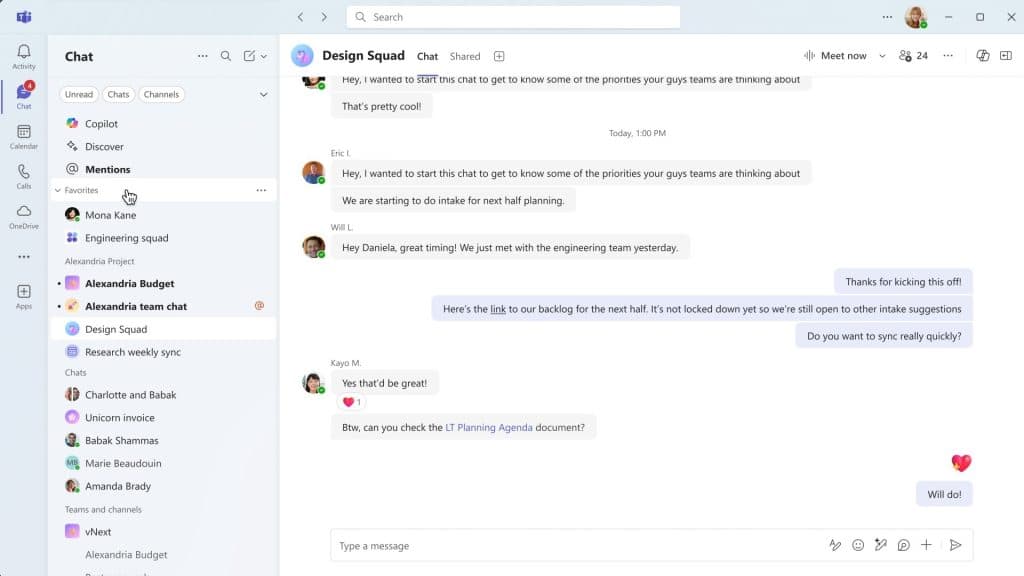
Another standout feature is the ability to pin specific chats and channels to the top of your list. This ensures that you always have your most relevant conversations at hand, no matter how many new messages you receive.
If you want to learn more details, you can watch the explanatory video here.
Quick access to your favorites
The chats and channels you use the most can now always be at your fingertips. Add them to your Favorites for quick and easy access, ensuring you never lose sight of what’s most important.
Previously, finding important conversations could be a challenge, especially when many messages accumulated. With this feature, accessing your most relevant chats and channels is made easier.
Organize your conversations with custom sections
If you work on multiple projects, you’ll love this feature. Now you can group your chats and channels into specific sections, allowing you to quickly find conversations related to each project or topic. Simply drag and drop chats and channels into their respective sections.
Previously, keeping things organized in Teams could be challenging, but with this new organizational capability, managing your communications can be simpler and more efficient.
For more information, you can watch the explanatory video at the following link.
Never miss an important mention
The new @mentions view gathers all your personal mentions into an interactive list. Quickly access Teams notifications with a single click. These include @mentions across chats, meeting chats, channels (including hidden channels), allowing you to focus and prioritize conversations. Until now, it was easy to miss critical mentions among the constant flow of messages.
When viewing chats separately from teams and channels in Chat and Teams, the @mentions view only shows results from your chats or your channels, respectively. After selecting a message, you will see the message in the context of its chat or channel in the side panel, and you can react or respond to the conversation.
Customize your Teams experience
Everyone has their own work style. Now you can adjust Teams to fit your workflow and information preferences. With the new customization controls, you can decide how to view your chats and channels. From separating these elements to seeing message previews or combining all channels into a single list. It’s up to you!
Availability and Next Steps
This new experience for chats and channels will make organizing your communications easier and improve customization according to your needs. Starting in November 2024, it will be available in public preview, with the general release planned for 2025. Additionally, the update will be compatible with all devices, ensuring uninterrupted productivity whether on PC, mobile, iOS, or Android.
To maximize the benefits of these new features and enhance your team collaboration, we invite you to contact us. Our team of experts is ready to help you implement and optimize the new Microsoft Teams experience in your organization, so you can get the most out of your communications.
Itequia team