
Automated testing with Playwright and AI: how to deploy with confidence
In development environments with continuous delivery cycles, manually validating every deployment quickly becomes a bottleneck. Manual testing does not scale. It depends on team availability, is difficult to reproduce consistently, and leaves room for error in every iteration. The outcome is predictable. Undetected regressions, longer diagnosis times, and a deployment cadence that slows down precisely when you need it to speed up.
For years, automated testing was the theoretically correct solution yet in practice it was routinely ruled out due to implementation and maintenance costs. That calculation has changed.
In this article we examine how Playwright, combined with AI, enables an efficient automated testing strategy. We explain what it covers, how it integrates into a CI/CD pipeline, and what impact it has on deployment cadence and reliability.
Playwright: what it is and why it matters
Playwright is a test automation tool developed by Microsoft that replicates the behavior of a real user in the browser. It handles DOM element interactions, form submissions, and navigation between views. Its primary function is to provide automated validation coverage that detects regressions before they reach the production environment.
Selenium was the reference standard for this type of testing for many years, but it has well-known limitations:
- Slow execution.
- Fragility when the interface changes.
- An API that has not aged well.
Cypress represented an improvement in developer experience, but shows relevant technical constraints in multi-tab and multi-origin scenarios. Playwright resolves both. It provides native support for Chromium, Firefox, and WebKit, parallel execution, and a modern, well-documented API. Its growing adoption reflects superior performance in real production projects, not just in controlled test environments.
Testing coverage: scope and use cases
The primary use case for Playwright is end-to-end testing. But its scope also covers API tests, component tests, and visual validation through screenshot comparison. In practice, the most common application is validating critical business flows: authentication, transactional processes, forms with complex logic. These are precisely the scenarios where a production failure has the greatest operational impact.
At Itequia, we integrate it primarily with TypeScript (Playwright’s reference language) on frontends built with Angular and React, with .NET backends. One technically relevant aspect is that Playwright validates the application from the presentation layer, independently of the backend stack. This simplifies integration in heterogeneous architectures.

Integration process and adoption curve
The initial Playwright setup is straightforward. A single command generates the project structure with functional examples ready to run. The real complexity lies not in the tool itself, but in defining a solid testing strategy. Which flows to prioritize, how to ensure test stability when the interface changes, and how to structure the suite for long-term maintainability. This is where integration with AI tools delivers the most distinctive value, as detailed below.
Diagnostic capabilities on failure
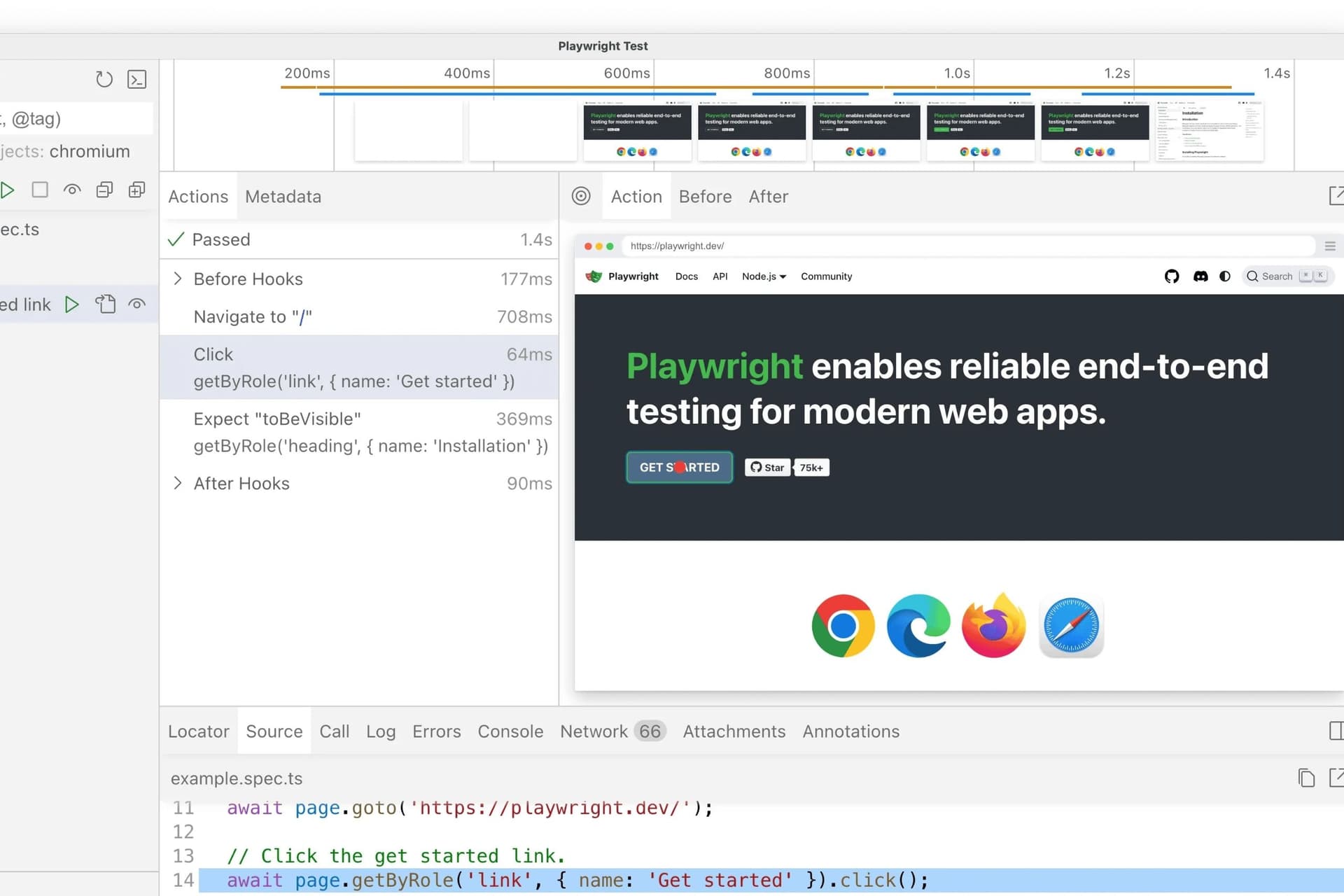
When a test fails, Playwright automatically generates a complete execution trace. Screenshots per step, video recording, a detailed log of the actions performed, and the browser state at the moment of the error. This traceability eliminates the ambiguity typically associated with failure diagnosis. Instead of starting from a generic error with no context, the team has precise information about which step failed, what state the interface was in, and what the specific error was. As a result, diagnosis time is significantly reduced.

Impact on delivery cadence
The difference between having an automated test suite and not having one translates directly into deployment cadence and reliability. Without automated coverage, every release depends on manual validation that takes time, does not guarantee thoroughness, and creates uncertainty. With a stable suite, teams can increase deployment frequency, reduce the number of regressions in production, and tackle refactoring tasks with lower technical risk.
The impact is not limited to the speed of each individual step, but to the elimination of the systemic friction that comes from a lack of confidence. Last-minute reviews, blockers when facing potentially disruptive changes, and recovery time from avoidable incidents.
AI integration: the workflow at Itequia
The most significant shift in automated testing practice does not come from Playwright alone, but from combining it with language models. At Itequia, we work with Claude Code as a development assistant integrated into the testing workflow.
The usual process starts by providing the model with real context: the code of the component to be tested and interface screenshots when available. With that context, Claude Code generates the complete test, including selectors, assertions, and intermediate state handling with a level of alignment to the actual code that a generic prompt cannot achieve. The result is not a template test that needs to be rewritten, but a functional starting point that the team reviews and incorporates into the suite.
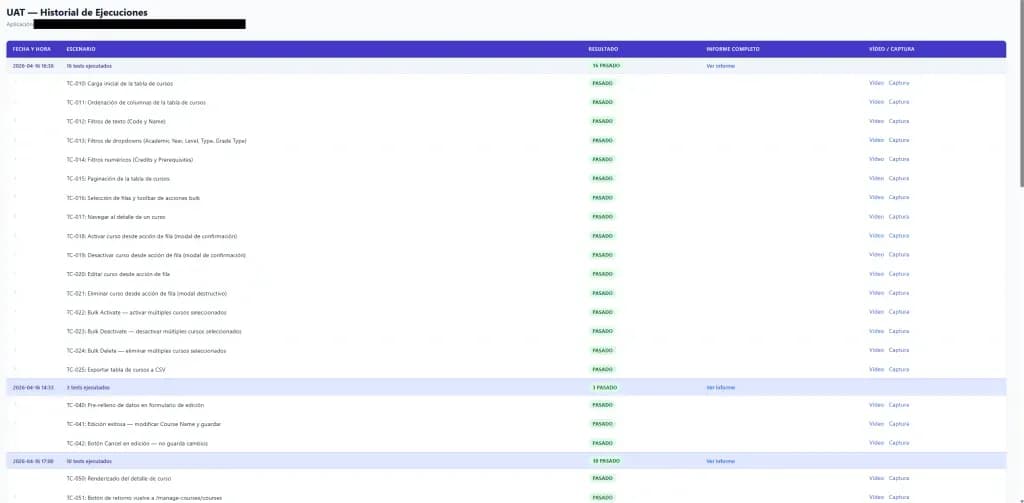
To standardize executions, we have developed an in-house plugin that consistently structures the artifacts generated by Playwright (execution folders, videos, and traces) and automatically generates an HTML report with the status of all tests in the suite. This report is consumable by both technical teams and Product Owners, turning test results into accessible information for everyone involved in the delivery process, not just those writing the code.
Contexts of application and limitations
Playwright is the right choice for any web application with critical business flows. E-commerce platforms, customer portals, internal applications with high-criticality processes. The prioritization criterion is straightforward the greater the operational impact of a production failure, the higher the return on investment in automated coverage.
There are, however, contexts where it is not the appropriate tool. It is not designed for unit tests or native mobile applications. In applications with highly variable interfaces or unstable execution environments, end-to-end tests can generate false positives if not designed carefully. In those cases, the recommendation is to be selective with coverage: automate the highest-criticality flows, not the entire interface.
What are the most common mistakes in early adoption?
Teams without prior experience tend to repeat the same mistakes: over-coverage from the start, tests that are fragile in the face of visual changes, and poorly isolated test data. Over time, the suite loses stability and credibility. The recommendation is the opposite: start with a reduced but robust coverage focused on the highest-value business flows, then expand it incrementally.
Recommended starting point
The most effective adoption process begins with identifying the highest-impact critical flow in the application, automating it, and integrating it into the CI/CD pipeline. With that first stable test running on every deployment, the team already gains tangible value. Incorporating AI assistance from this initial phase significantly reduces ramp-up time and allows the team to focus on defining the coverage strategy rather than writing test code.
A technical architecture decision
The cost of implementing and maintaining automated testing has long been the main argument for deferring it. With AI-assisted generation, that cost has been substantially reduced while the operational benefits (higher deployment frequency, lower regression rate in production, greater capacity for refactoring) remain intact. Automated testing has moved from being an optional investment to a technical architecture decision with a direct impact on product sustainability.
At Itequia, we offer a free initial review of your team’s testing workflow. We analyze current coverage, identify priority flows, and show what can be automated with Playwright and AI, and in what timeframes. Want to learn more? Get in touch and tell us about your case.